
Powerful report generator
for developers
Create, customize, and integrate reports seamlessly and fast.
Embed List & Label as a flexible report generator into your desktop, web, and cloud apps — without building a reporting engine from scratch.
No credit card required · Full-feature trial
Trusted by thousands of developers and software vendors worldwide.


& Visualization
Graph & Flow


An embedded developer component — not a SaaS
List & Label lets you add reporting, print and export functions to your software. Design print-ready reports and interactive dashboards, render them in your app, and export to dozens of formats.
The report generator runs inside your application, which makes it ideal for on-premises, air-gapped, and privacy-sensitive environments.
 List & Label
Real output from our sample application, live in an embedded frame. The report engine renders inside your application, your data never leaves your infrastructure.
Why developers choose List & Label as their report generator
Flexible integration
Embed the report generator SDK in .NET (8/9/10, Framework 4.x), C#, VB.NET, Delphi, and C++.
End-user report designer
Ship a powerful, customizable designer with your app so users can create and modify their own reports — no code required.
Export to 28 formats
PDF (including PDF/A), Excel/XLSX, Word/DOCX, HTML, CSV, JSON, XML, and more.
Works with your data
Database-agnostic: SQL, Oracle, OData, REST, XML, JSON, in-memory objects and many more. Your data, your rules.
Cross-platform reporting
Consistent behavior across Windows, Linux, and macOS — with mobile support for Android and iOS.
Interactive dashboards
Go beyond printing reports. Build interactive dashboards with drilldown, filtering, and KPIs.
“My favorite feature of List & Label Cross Platform is its simple interface. It’s very easy to understand and therefore enables quick creation of a PDF from C#.”
From invoices to embedded dashboards
Operational reports
Invoices, packing slips, labels, and forms.
Analytics
Dashboards with drilldown and filters.
Document generation
Quotes, contracts, and compliance PDFs.
Embedded reporting
White-label reports inside ISV and SaaS products.
Which topic would you like to explore?
Cross-platform reporting
List & Label Cross Platform (LLCP) allows you to run reports on Windows, Linux, macOS, and cloud environments, including Docker containers.
- One template, identical output on every OS
- Headless rendering in containers and CI/CD
- Windows, Linux, macOS, plus Android & iOS
Export formats & data sources
Export to 28 formats and connect virtually any data source — from classic databases to REST endpoints and in-memory objects.
- PDF/A, XLSX, DOCX, HTML, CSV, JSON, XML and more
- SQL, Oracle, OData, REST, XML/JSON and more
- In-memory object collections
List & Label engine
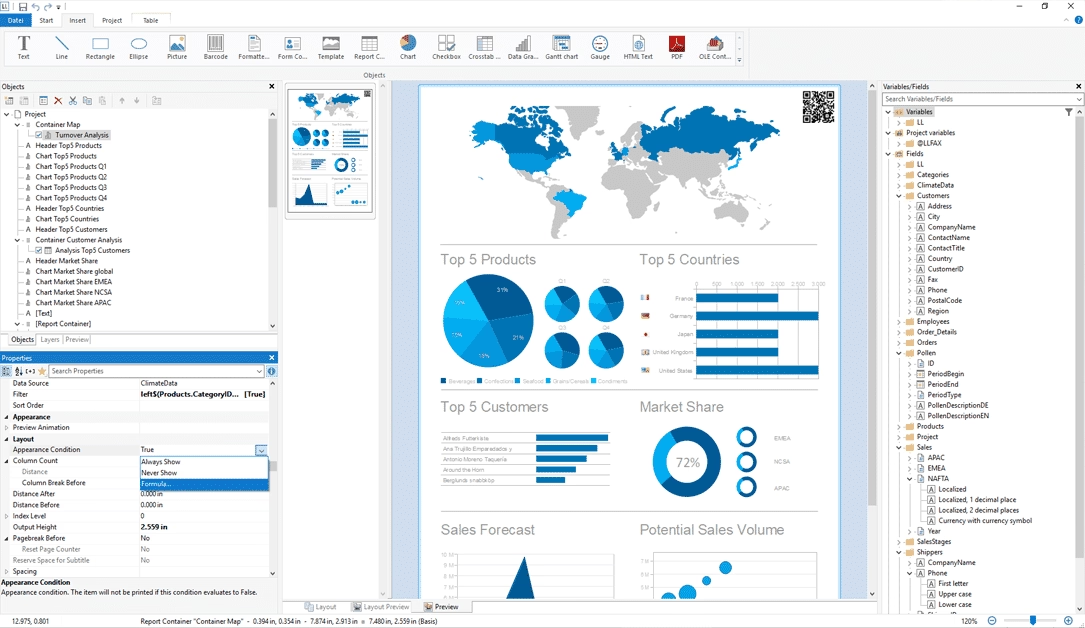
End-user report designer
Ship a pixel-perfect WYSIWYG designer with your application so users build their own reports — tables, charts, cross-tabs, and barcodes included.
- Royalty-free redistribution
- Lock data sources and restrict fields per role
- Native tables, charts, cross-tabs, barcodes
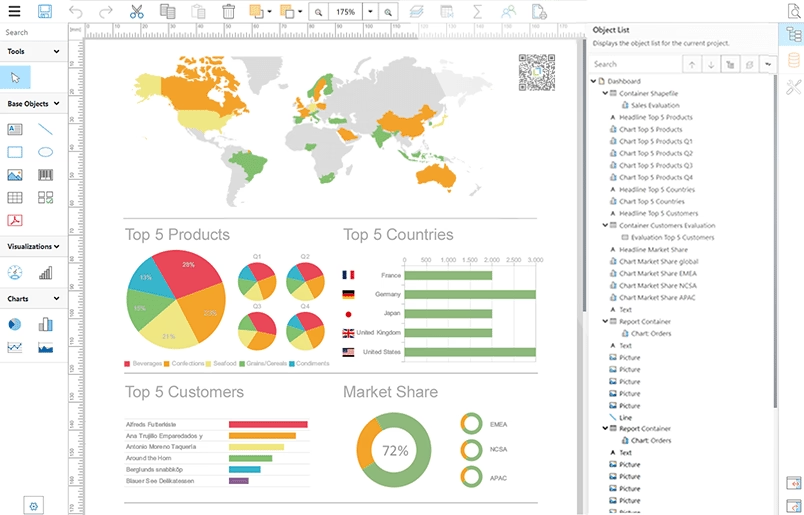
Web Report Designer
Give users a full report designer right in the browser. No installation required. Perfect for SaaS and cloud-hosted applications.
- Runs in the browser, zero install
- Ideal for SaaS and multi-tenant apps
- Same template format as the desktop designer
Development & integration
Add List & Label with a NuGet package, a render call, and an export. Run it entirely from code, headless, or with the visual designer.
- NuGet package for .NET
- Headless rendering in services and jobs
- Store templates in Git like source code
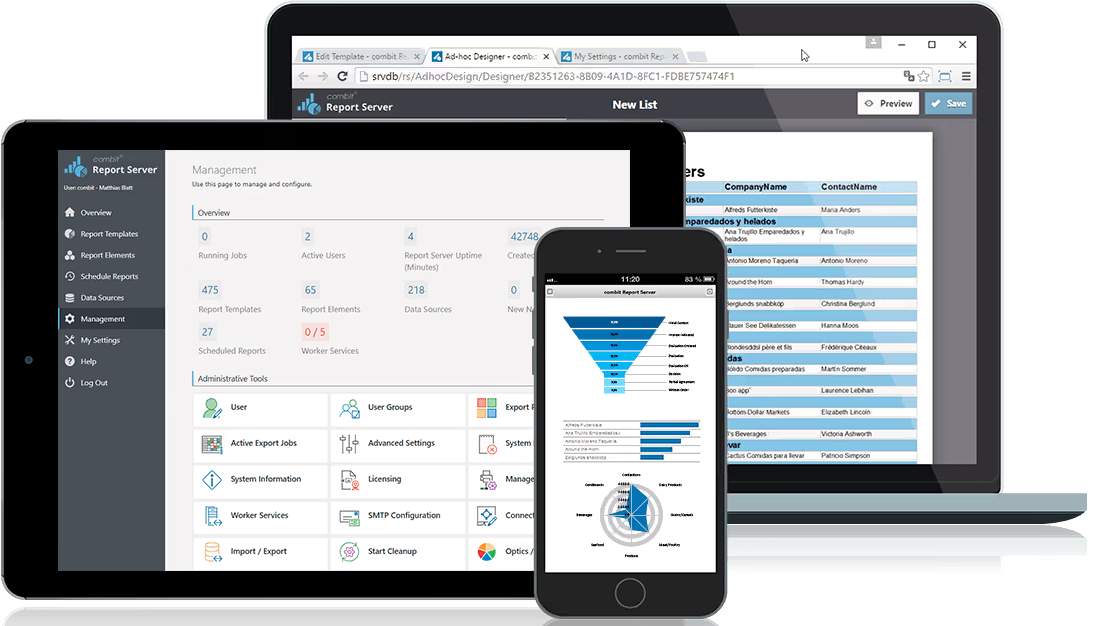
combit Report Server
A flexibly scalable, web-based reporting platform that integrates into your cloud or on-premises infrastructure. Create, view, edit, and share reports with others.
- Ready to use out-of-the-box on Windows
- Flexible linking to almost any data source
- Platform-independent — any browser, desktop or mobile
- Cloud reporting via REST API, no in-house dev needed
See List & Label in action
Try the fully functional free trial of report generator List & Label. Includes all features and sample projects. No credit card required.
Built for teams that ship software
ISVs & SaaS teams
Add automated reporting and document workflows without the cost of building your own.
Enterprise IT
Generate complex business reports and forms with minimal dev time.
Consultants & agencies
Deliver customized reporting solutions across industries.
Fast, flexible, and fully customizable
No bloated reporting stack. No locked-down workflows. You control the integration depth, UI, permissions, data, and output. So reporting works the way your app works.
Want silent printing or report automation? No problem — run it entirely from code, no designer required.
$ dotnet add package \
  combit.ListLabel31.CrossPlatform

using combit.Reporting;

var ll = new ListLabel();
ll.DataSource = orders;
ll.AutoProjectFile = "Sales.json";
var cfg = new ExportConfiguration(
  LlExportTarget.Pdf, "Q3.pdf", "Sales.json");
ll.Export(cfg);
“List & Label is the best thing since sliced bread. I started using LL in version 8 and I just simply love it.”
Ready to get started?
Download the fully-functional trial, explore features, and browse the docs and code samples.
If you want guidance on a specific reporting use case, contact us or use our resources.
FAQ
Getting started & integration
How do I add List & Label to a .NET project?
Install the List & Label NuGet package, add a render call (template + data), and export to a format (e.g., PDF). You can run it entirely from code. No designer required.
Can I generate reports without the visual designer?
Yes. You can create and render reports entirely via code using the API. The Designer is optional.
Is List & Label a standalone reporting tool?
No. It is a developer component. You integrate the report generator into your software and optionally ship the end-user Designer. If you are looking for a standalone reporting tool, have a look at the combit Report Server.
Can I migrate templates from other report generators?
Yes, you can migrate templates from other report generators to List & Label, but the level of automation depends on the source system.
Deployment & platforms
Can I render reports on a server or in background jobs?
Yes. The cross platform engine supports headless rendering in Windows services, Linux daemons, and scheduled tasks. No UI needed.
Does it work in Docker / Kubernetes?
Yes. The report generator runs headless in containers.
What platforms does List & Label support?
Windows desktop (WinForms, WPF, Delphi), web (ASP.NET), and cloud deployments.
Can I use List & Label for cross-platform reporting?
Yes. List & Label Cross Platform (LLCP) is designed to support reporting on Windows, Linux, and macOS, including Docker containers and cloud environments.
Is List & Label cloud-based?
Optionally yes (if your own app runs in the cloud), but basically no. It runs inside your application, which helps with data privacy and compliance.
Data & templates
Where should I keep report templates?
Store templates in Git (or your repo) like code. Many teams load them at runtime from a folder, data base, or object storage.
Can I use List & Label with my existing database?
Yes. It supports virtually any data source — from SQL to object collections, XML/JSON, REST, and OData.
Can I use List & Label with REST APIs or in-memory objects?
Yes. In addition to classic databases, it works with REST endpoints, XML/JSON, and in-memory data structures.
How do I localize reports (dates, numbers, etc.)?
Set the culture at runtime and use localized strings in templates. Use the Translate$ function and the built-in Dictionary to manage translations for labels, dates, numbers, and more.
Designer & licensing
Can I limit what end users can change in the designer?
Yes. You can hide features, lock data sources, restrict fields, and whitelist export formats per role or customer.
How is List & Label licensed?
Licensing is developer-based and includes royalty-free distribution. You can distribute the component as part of your app without additional fees. More questions about licensing? Visit the licensing FAQ.